
CDisplayEx Comic Reader Lite
Progdigy SoftwareComics
4.0313.00 Reviews
- Version
- Varies With Device
- Installs
- 1.00M
- Age Rating
- Everyone
Screenshots
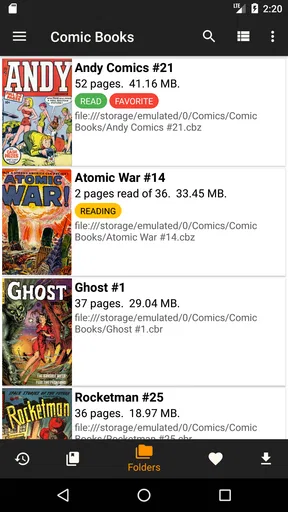
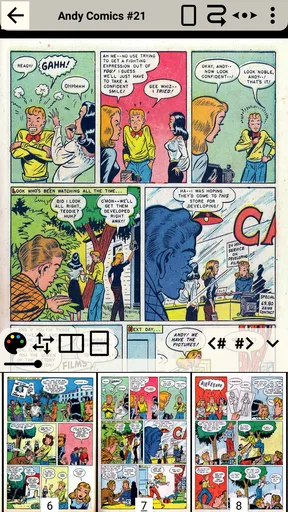
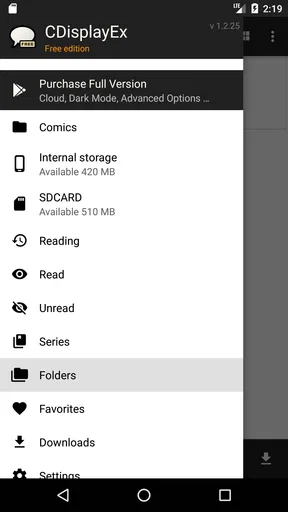
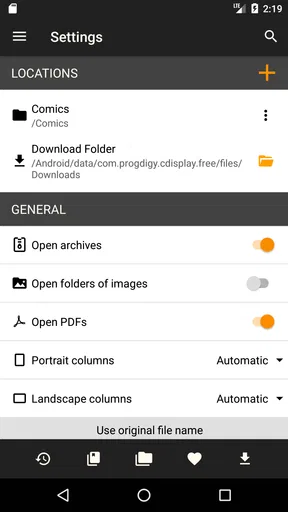
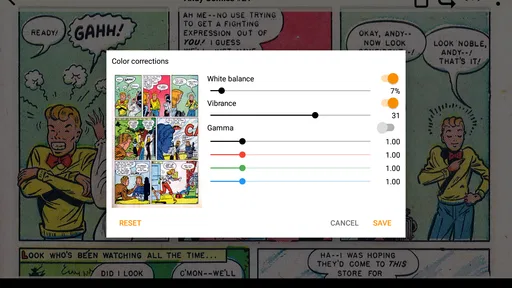
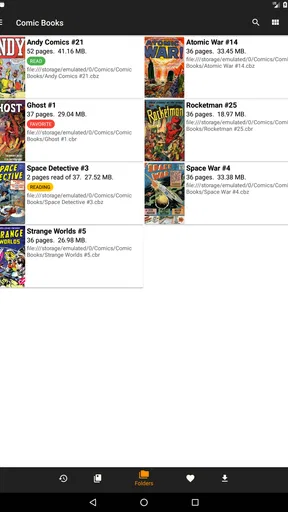
Our Review of CDisplayEx Comic Reader Lite
 Analysis by Appyee
I spent time with CDisplayEx Comic Reader Lite as a practical comic-reading app rather than treating it like a simple file viewer. The first impression is easy to understand: it gets out of the way and lets the pages take over the screen. That sounds obvious, but it matters when the alternative is an app crowded with recommendations, accounts, social features, or a storefront. This is a focused tool for people who already have comics to read and want a comfortable way to open them on a mobile device.
It belongs to the Comics category, is made by Progdigy Software, and is free to use. Its Everyone age rating also makes it approachable for a broad audience, although the material you open inside any comic reader still depends entirely on your own files. With an average rating of 4.0 from around fifteen thousand ratings and more than a million installs, it has clearly found a substantial audience. My main question was not whether it could open a comic, but whether it would remain useful after the first week of curiosity.
From the first week to a lasting reading habit
I judge a reading app by what happens after the first few sessions: whether it still feels easy to return to, and whether it fits the way I actually keep comics. Here, the useful next step is to notice which parts of a reading routine feel effortless and which depend on how well the files are arranged. That distinction leads naturally to a closer look at how the app accommodates different readers and situations.
Why the first sessions feel so straightforward
The strongest early appeal is concentration. When I opened a comic, the experience felt centered on page viewing instead of trying to turn reading into a broader service. That makes a difference for someone moving from paper to a phone or tablet, or for a reader who keeps a personal collection and does not want to reorganize everything around a new platform.
The Lite edition is especially easy to understand as a companion for locally stored reading material. You bring your own comics, browse them through the reader, and settle into the page flow. That arrangement is useful for collections gathered from different places because the app does not force the reader to think about a single catalog or publisher ecosystem before starting a book.
During the first week, I found the most important adjustment was choosing the right device and orientation. A phone is convenient for short chapters and quick reading sessions, but a tablet gives page lettering more breathing room. On a smaller screen, zooming becomes part of the rhythm, particularly with pages containing dense dialogue or detailed artwork. That is not a fault unique to this app, but it changes how enjoyable the reader feels in everyday use.
One practical tip is to prepare your library before a long trip instead of waiting until you are already offline or short on time. Put the files you actually intend to read in an easy-to-find folder, use clear filenames, and test a complete chapter before leaving. A comic reader can be technically capable and still become annoying if every session starts with searching through a messy storage location.
The page-viewing details that matter more than the headline
Comic reading is unusually sensitive to small interface decisions. A page that looks fine in a file manager may feel awkward when the reader opens it with the wrong scale, while a double-page spread can lose its impact if it is treated like two unrelated portrait pages. I paid attention to how often I had to interrupt reading to adjust the view, because that is a better measure of comfort than a list of supported formats.
CDisplayEx Comic Reader Lite works best when I treat it as a visual reading environment rather than a general document utility. The goal is to establish a repeatable gesture pattern: open a book, move through pages, enlarge a panel when necessary, then return to the normal view without losing the thread. Readers who enjoy manga, graphic novels, or scanned comic archives will recognize this need immediately. The artwork and lettering are arranged for a page, not for a continuous text column.
There is also a useful trade-off between speed and control. A reader that exposes every possible adjustment can make the first session feel complicated. A leaner approach is faster when I simply want to continue a story. On the other hand, people with very particular preferences about page direction, scaling, or panel visibility may eventually wish for more fine-grained control. This is one reason I would test a few different books before deciding that it should become my permanent reader.
A realistic everyday scenario
Imagine finishing work and wanting to read two chapters during a train journey. Before leaving, I copy the selected books to the device and make sure they open correctly. On the train, I use the phone for a short section, switch to a larger screen later, and return to the same collection without needing a separate account or a store search. That is where a local comic reader earns its place: it supports a habit built around your own library, not around whatever content happens to be promoted that day.
Another useful scenario is keeping reference comics available for repeated browsing. An artist, student, or fan may want to revisit page composition, character design, or a particular sequence without carrying physical volumes. In that role, the app is less about reading one story from beginning to end and more about making a personal visual archive accessible. The benefit comes from dependable access and a familiar viewing routine.
What changes after the novelty fades
After the first week, the excitement of trying a new reader disappears, which is exactly when its design has to prove itself. I stopped judging it by how quickly I could open a sample file and started judging it by whether I still wanted to use it for the next book. The answer depends heavily on your relationship with local files.
If your reading is based on a personal collection, the app has recurring value because the same simple workflow applies every time. You do not need to learn a new interface for each publisher or rebuild your reading environment around a subscription. If your expectation is a discovery service with a large built-in catalog, this is a different proposition. It is a reader first, not a replacement for every way people obtain comics.
That distinction also explains why some users may rate the experience differently. A person with an organized archive may appreciate the directness, while someone who wants recommendations, synchronized shelves, or an integrated purchasing system may find the app too narrow. Neither reaction is unreasonable. The lasting value comes from matching the tool to the job.
Month-to-month value for different readers
For occasional readers, the free price makes experimentation easy. You can see whether the viewing style fits your device and your collection without turning the decision into a financial commitment. I would still avoid installing it merely because free apps are easy to accumulate. Its value appears when it becomes the place you naturally open a comic, not when it sits unused beside several alternatives.
For regular readers, the important question is whether the app reduces friction between sessions. A good routine might be to keep unfinished books together, remove files you have completed, and avoid mixing enormous archives with the titles you are currently reading. This is not glamorous maintenance, but it prevents the reader from becoming a storage-browsing chore.
For families or shared devices, the Everyone rating makes the app broadly accessible as software. Still, I would organize the library carefully because the age suitability of a reader does not automatically describe every comic stored inside it. Separate personal collections and use clear folders if several people read on the same device. That small step prevents the app from feeling confusing or impersonal.
For collectors, the trade-off is more pronounced. A local reader gives you control over your own files, but it also means you are responsible for naming, backups, and deciding how to preserve a collection. If you want a service to manage purchases and availability for you, a publisher-specific app or a digital comics storefront may be more convenient. If you value independence from a particular catalog, this app is more appealing.
Maintenance is mostly about the library, not the reader
The maintenance burden is modest, but it does not disappear. The application can only make a disorganized collection feel so manageable. I found that consistent filenames were more valuable than repeatedly changing reader settings. Including the series name and reading order in filenames helps prevent accidental jumps, especially when a collection contains specials, alternate editions, or chapters saved from different sources.
Backups are another overlooked issue. A comic reader is not a substitute for preserving the files themselves. If a device is lost or replaced, the reading interface may be easy to reinstall, but your personal archive still needs its own backup plan. I would keep important material in another safe location and treat the phone or tablet as a reading copy rather than the only home for the collection.
Storage management matters too. Large image-heavy books can occupy more space than expected, and keeping every completed volume on a mobile device can eventually make browsing slower or simply less pleasant. My preferred routine is to keep current and soon-to-read books on the device, archive finished material elsewhere, and periodically remove duplicates. This makes the app feel faster to use even when the software itself has not changed.
There is a useful distinction between app maintenance and collection maintenance. Updating an app is a normal part of keeping any mobile tool usable, but the recurring work that affects this particular experience is sorting and preserving the comics. Readers who dislike file management should know that this responsibility is part of the local-library advantage. Readers who already manage folders will probably consider it a fair exchange for control.
Where fatigue begins during long sessions
The biggest source of fatigue is not the basic act of turning pages; it is the physical limit of the screen. A phone can make a comic available almost anywhere, but it cannot always make small lettering comfortable. Long sessions may require more zooming, more repositioning, or a larger device. If you regularly read intricate pages for an hour at a time, a tablet or paper edition may be a better choice regardless of which reader you install.
Another point of friction appears when a book’s layout does not match your preferred reading method. Double-page compositions, unusual page dimensions, and scans with generous margins can require extra attention. A reader can display the material faithfully while still leaving you to decide how best to view it. That is a reasonable limitation of a general comic reader, but it means the experience will not be equally smooth with every collection.
There is also fatigue from switching between ecosystems. If some of your comics live in a publisher app, others are downloaded as files, and still others are physical books, no single reader can create a perfect unified history. This app is strongest when you give it a defined role, such as reading your local archive. It becomes less satisfying when you expect it to replace every other source and remember every detail across them.
Readers who want automatic discovery may also tire of the quiet interface. The absence of a strong content-discovery layer can feel refreshing when you know what you want, but empty when you are looking for something new to read. In that situation, a comics service with recommendations may be the better companion, while this app remains useful for personal files.
How it compares with usual alternatives
Compared with a generic document viewer, this app makes more sense for page-based artwork. A document reader may handle text efficiently but often feels less natural with panels, spreads, and large images. Compared with a publisher’s app, CDisplayEx Comic Reader Lite offers a more collection-centered approach: you are not limited to one company’s catalog or presentation style. The cost of that freedom is that you handle the files and organization yourself.
Compared with reading in a web browser, a dedicated reader usually feels calmer for a saved collection. The browser is excellent for discovering and accessing online material, but it can bring tabs, logins, changing layouts, and interruptions into the reading session. A local reader is better when the book is already yours and you want a stable environment. The browser remains preferable when your comics are primarily web-based or when you do not want to manage downloads.
Compared with a premium specialist reader, the question is not simply whether one app has more controls. It is whether those controls solve a problem you actually have. If you need elaborate synchronization, advanced library management, or a highly customized reading workflow, another option may justify its place. If you want a free, direct way to open and read a personal comic collection, the Lite edition is easier to recommend.
Who should install it, and who should skip it
I would recommend it to someone who already owns comic files, prefers reading without a storefront, and wants a focused app for regular sessions. It is also a sensible choice for readers who move between devices and want their collection to remain under their own control. The free price lowers the risk, and the broad age rating makes the software approachable for mixed households, provided the library itself is organized responsibly.
I would skip it if your main goal is discovering and buying comics inside one polished service. I would also hesitate if you strongly dislike folders, file transfers, backups, or the small amount of housekeeping that comes with a personal archive. People who read only on a small phone and are sensitive to frequent zooming may prefer paper, a larger display, or a reader with a workflow better suited to their particular page layouts.
My advice is to test it with three different kinds of material: a standard page, a dense page with small lettering, and a spread-heavy book. Then try a short session on the device you actually use most. That test tells you more than opening one ideal file. If all three feel manageable and the local-library workflow appeals to you, the app has a good chance of becoming a regular tool rather than another forgotten installation.
The long-term verdict
Progdigy Software has made a comic reader whose lasting appeal comes from restraint. It does not need to become the center of your media life to be useful. Its job is narrower: help you read comics already available to you, with as little interference as possible. For the right reader, that narrow purpose is a strength rather than a weakness.
My final view is positive, with a clear condition: its long-term value depends on whether you want a reader or a comics service. As a reader for a maintained personal collection, it earns space because the workflow remains understandable after the novelty disappears. As a complete answer to discovery, purchasing, synchronization, and library management, it is less convincing than a dedicated ecosystem built around those needs.
The app was released on April 15, 2018, and its continued presence alongside a sizeable user base suggests that the basic idea has remained relevant. I would not choose it for flashy extras; I would choose it because a quiet, local reading routine can be more dependable than a crowded alternative. If that matches how you read, CDisplayEx Comic Reader Lite is worth keeping installed.
Privacy and Permissions
See what permissions an app requests and how it handles your data.
- Photos/Media/Files
- read the contents of your USB storage, modify or delete the contents of your USB storage
- Storage
- read the contents of your USB storage, modify or delete the contents of your USB storage
- Other
- view network connections, full network access, prevent device from sleeping
Verdict
Strengths of CDisplayEx Comic Reader Lite
- Supports CBZ, CBR, PDF, and image files for flexible comic reading.
- Smooth page navigation with useful zoom and reading controls.
- Includes bookshelf organization for keeping your comic collection tidy.
- Works offline, making it suitable for travel or areas with limited internet.
- Available on Android with a lightweight interface and low storage demands.
Limitations of CDisplayEx Comic Reader Lite
- The Lite version includes advertisements during use.
- Some advanced features are limited compared with the paid edition.
- PDF and image rendering may vary depending on file size and quality.
- Library setup can feel less intuitive for users with large collections.
- Not all comics display perfectly when using unusual page layouts or formats.
Other Releases by Progdigy Software
View All
CDisplayEx Comic Reader
Comics4.9
Similar Picks in This Category
View All
WEBTOON: Manga, Comics, Manhwa
NAVER WEBTOON4.6

MangaToon: Comic & Manga
MangaToon4.3

네이버 웹툰 - Naver Webtoon
NAVER WEBTOON4.3

Tapas – Comics and Novels
Tapas Entertainment Inc.4.2

Lezhin Comics - Daily Releases
LEZHIN ENTERTAINMENT3.3

WebComics - Webtoon & Manga
WEBCOMICS HOLDINGS HK LIMITED4.4
Frequently Asked Questions
What is CDisplayEx Comic Reader Lite?
CDisplayEx Comic Reader Lite is an Android comic-book reader designed for opening and viewing digital comics and manga. It supports popular formats such as CBZ, CBR, PDF, and image files, depending on the version and device. Its interface focuses on straightforward reading, page navigation, zooming, and organizing a personal comic library without unnecessary complexity.
Which comic formats does CDisplayEx Comic Reader Lite support?
The Lite edition is intended to handle common digital-comic formats, including CBZ and CBR archives, as well as PDF documents and standard image files. Compatibility can vary according to Android permissions, file location, archive structure, or unusual compression methods. Before downloading a large collection, it is sensible to test a few files from your library to confirm that they open correctly.
Can I read comics offline with CDisplayEx Comic Reader Lite?
Yes, comics stored locally on your Android device can generally be read without an internet connection. This makes the app useful for travel, commuting, or places with unreliable service. You must first transfer or download the comic files to the device and grant any requested storage or media permissions. Online cloud files may require separate downloading before offline reading is possible.
Does CDisplayEx Comic Reader Lite include useful reading features?
The app provides the essential tools expected from a comic reader, such as page-by-page navigation, zoom controls, bookmarks or reading-position management, and library browsing. Depending on the release, users may also find options for double-page viewing, right-to-left manga reading, image scaling, and screen orientation. Feature availability can differ between the Lite and paid versions.
Is CDisplayEx Comic Reader Lite free, and are there limitations?
CDisplayEx Comic Reader Lite can be downloaded and used without purchasing the full edition, making it a practical way to evaluate the reader before paying. However, the Lite version may include advertising or omit premium conveniences available in the paid app. Users should check the current Google Play listing for exact restrictions, supported Android versions, permissions, and any in-app purchase details.
